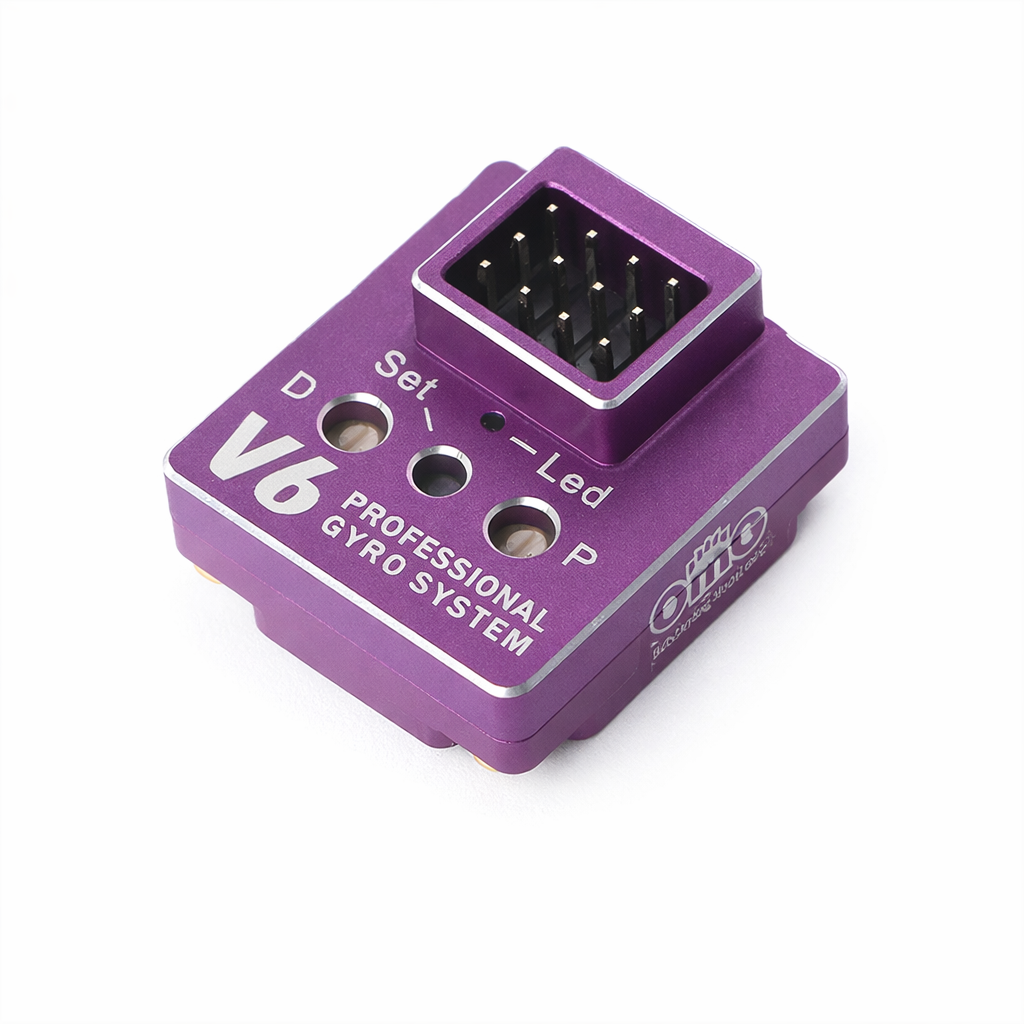
The RC Drift Gyro OMG V6 is a high performance PID steering gyro designed to deliver smooth, precise control for RC drift car setups. Built specifically for RC drifting, this gyro helps stabilise steering input, improve counter steer response, and maintain consistent control during aggressive drift transitions.
This RC drift gyro features an advanced PID control algorithm combined with a high quality InvenSense sensor, allowing accurate detection of steering movement and rapid correction in real time. The result is smoother slides, reduced snap over steer, and improved overall driving confidence on high grip and low grip RC drift surfaces.
The RC drift gyro includes adjustable gain settings, making it easy to fine tune steering response to suit different RC chassis, servo setups, tyres, and driving styles. Whether you prefer a softer, more realistic drift feel or a sharper competitive setup, this gyro offers the flexibility needed for precise tuning.
Compact and lightweight, the RC drift gyro is suitable for most 1/10 scale RC drift cars and integrates easily into modern RC electronics layouts. It is ideal for both beginner and experienced RC car drivers looking to improve consistency and control.
Features
- RC steering gyro designed specifically for RC drift cars
- PID steering control for smooth and stable handling
- versatile with 6 setting modes
- High precision InvenSense sensor
- Adjustable gain for fine-tuned steering response
- End point adjustment/setup to help prevent over lock.
- Improves counter steer and drift stability
- Suitable for most 1/10 RC car setups
What’s Included
This RC drift gyro is an excellent upgrade for RC drifters looking to improve steering control, consistency, and confidence in RC drifting. With PID control, adjustable gain, and a responsive sensor, it provides reliable performance for both casual and competitive RC drift car use.
Key Specifications:
Operating voltage: 4.8-8.4V
Operating current: 18mA @ 6V
Supported servo pulse width: 300-1520μs
Supported frequency: 50Hz-760Hz
Control system: PID control
Gyro sensor: American Invensense
Angular velocity: ±4000°/s
Function Overview:
SW (Switch Button):
Output direction change: In standby mode, press and hold the SW button for 3 seconds to switch between normal and reverse output direction. Select the correct direction based on your servo and chassis layout.
Curve mode selection: In standby mode, short press the SW button to cycle through 6 different curve modes. The number of blue LED flashes indicates the selected mode. Choose the mode that best suits your track conditions, driving style, and servo characteristics.
Gyro Endpoint Limit Setup:
Set your transmitter steering EPA correctly before setup. Do not exceed the physical steering limits of your chassis.
Power off the car.
Press and hold the SW button, then power on the car.
Release the SW button when the blue and red LEDs flash slowly.
Turn the steering fully left and press the SW button to register the left endpoint.
Turn the steering fully right and press the SW button to register the right endpoint.
When the LED becomes solid, the endpoint limit is set successfully.
Resetting Gyro Endpoint Limit:
Power off the car.
Press and hold the SW button, then power on.
Continue holding the SW button for 3 seconds.
The LED will flash quickly and then turn solid to indicate a successful reset.
D (Damper Adjustment):
The damper knob controls anti shake and servo response speed, with a 240 degree adjustment range (arrow position from approximately 8 o'clock to 4 o'clock). Factory default is 12 o'clock.
Turn anti clockwise to increase steering response and shaking.
Turn clockwise to reduce steering response and shaking.
Adjust according to servo type, track surface, chassis setup, and steering behaviour.
P (Priority Adjustment):
This controls the balance between gyro correction and steering wheel input.
Lower setting increases gyro influence.
Higher setting increases direct steering wheel control.
Adjustment range: 0.325 to 1.25
Channel Connections:
ST: Connect to steering servo
RX: Connect to receiver CH1
CH3 (Gyro Gain): Connect to receiver CH3 or another available channel. Gain increases as the channel value increases. At 50% channel value, gyro gain is zero.
CH4 (EPA Fine Tuning): Used to fine tune gyro EPA travel by +/-4 degrees from the preset endpoint. Helps optimise drift angle for different chassis and surface resistance.
LED Status Indicators:
Slow flash > Fast flash > Solid: Power on self test
Blue LED fast flash: No signal
Blue and red LED slow flash: Endpoint limit setting mode
Red LED solid: Normal operation
Blue LED segmented flash: Curve mode selection
Important Warnings:
The white wire on the harness cable is the signal wire. Ensure correct connection before use.
Install the gyro on a flat surface and away from the motor to minimise vibration interference.
During power on, avoid strong vibrations from other electronic devices as this may cause gyro initialization failure.